I held out on the App Router for an embarrassingly long time. Not because I thought it was bad, but because I had a Pages Router app that worked, paid the bills, and didn't fall over at 2am. "If it ain't broke" is a powerful drug for a working developer.
Then I started a greenfield project and forced myself to commit. A few months in, going back to the old getServerSideProps dance felt like switching from a mechanical keyboard back to a typewriter. So this is the honest version of the comparison — not the one from the marketing page, but the one I'd give a friend over chai who's about to start a new Next.js project and genuinely doesn't know which folder to put their files in.
The two routers, minus the hype
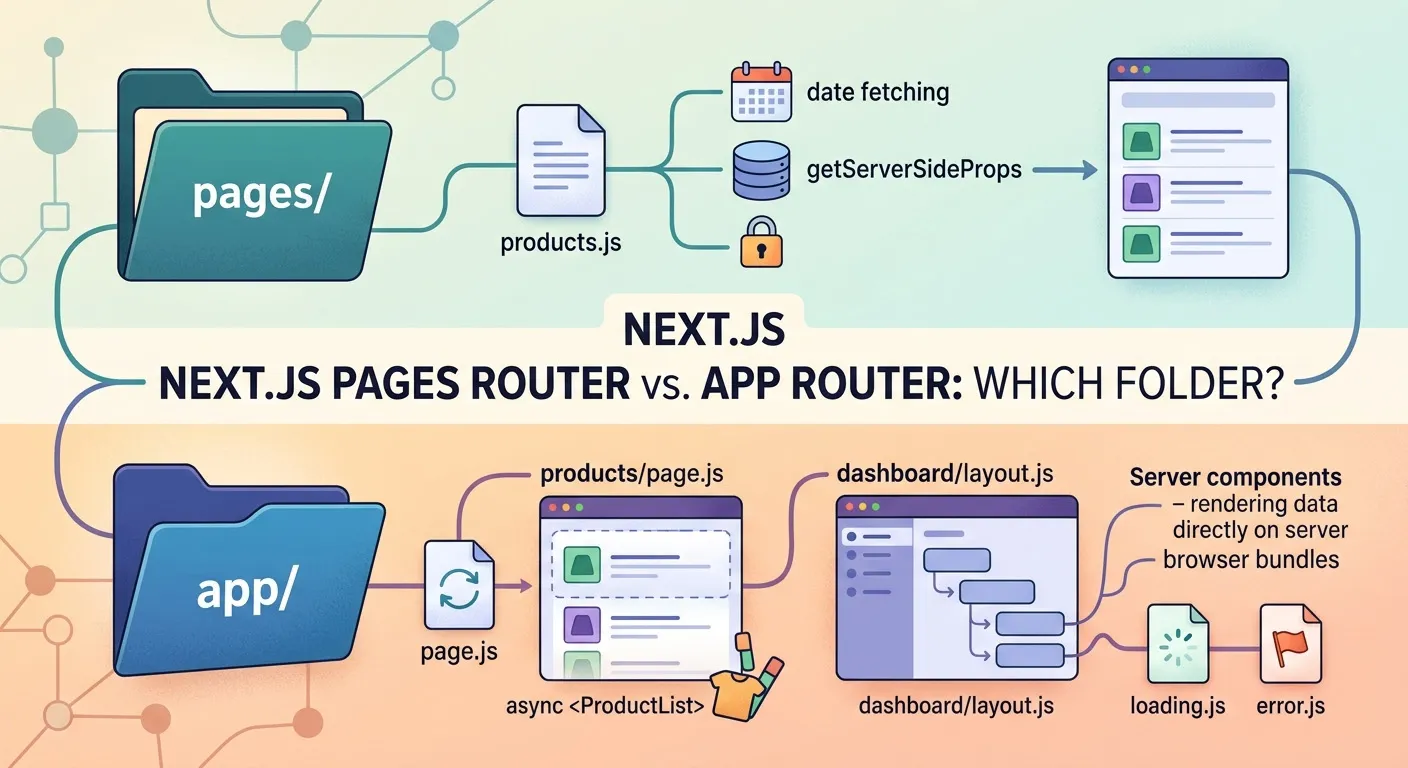
If you've somehow avoided the noise: Next.js now ships with two routing systems side by side. The Pages Router is the original — every file in pages/ becomes a route, and you fetch data with getServerSideProps, getStaticProps, and friends. The App Router lives in app/, is built on React Server Components, and introduces a set of special filenames (page.tsx, layout.tsx, loading.tsx, error.tsx) that each do one fixed job.
The thing worth knowing in 2026: the App Router arrived in Next.js 13 and is now the default in Next.js 16, and it's been stable since 13.4 — so this isn't bleeding-edge anymore. The Pages Router still works and still ships; both systems are supported. But it's pretty clearly where the new features aren't going, and that distinction matters more than any feature checklist.
Data fetching is where you'll feel it first
This is the single biggest day-to-day difference, and honestly the one that sold me.
Here's the Pages Router way — data fetching is bolted onto the route through a special exported function:
// pages/products.js
export async function getServerSideProps() {
  const res = await fetch('https://api.example.com/products')
  const products = await res.json()
  return { props: { products } }
}
export default function Products({ products }) {
return <ProductList products={products} />
}
It works fine. But notice the ceremony: a separate function, a props object, and your component can't fetch its own data — it just receives whatever the page-level function decided to hand down.
Now the App Router version:
// app/products/page.js
export default async function Products() {
const res = await fetch('https://api.example.com/products')
const products = await res.json()
return <ProductList products={products} />
}
That's it. The component is async, it fetches its own data on the server, and nothing about that fetch ever reaches the browser. The first time you delete a getServerSideProps and just await inside the component, it feels slightly illegal. Then it just feels right.
Layouts that actually persist
The other thing I didn't know I wanted. In the Pages Router, shared layout usually meant wrapping things in _app.js, and persistent nested layouts — keeping a sidebar mounted, preserving scroll position across navigation — were a known pain.
The App Router makes layouts a first-class file:
// app/dashboard/layout.js
export default function DashboardLayout({ children }) {
return (
<div className="dashboard">
<Sidebar />
<main>{children}</main>
</div>
)
}
Every route under dashboard/ gets wrapped in this, and the Sidebar doesn't re-render when you move between child pages. For anything with a persistent shell — an admin panel, a settings area — this alone is a strong argument.
Where the App Router still bites
I'm not going to pretend it's all smooth. A few things still catch people, including me.
The big migration gotcha right now is that params and searchParams are async. In older tutorials you'd read params.slug directly. Not anymore:
// app/blog/[slug]/page.js
export default async function Post({ params }) {
const { slug } = await params   // params is a Promise now
const post = await getPost(slug)
return <Article post={post} />
}
Forget that await and you'll get a confusing error that doesn't obviously point at the cause. I've lost time to this more than once.
Then there's the server/client boundary. Server Components are the default, which means the moment you reach for useState, onClick, or anything browser-only, you need 'use client' at the top of the file:
'use client'import { useState } from 'react'
export default function Counter() {
const [count, setCount] = useState(0)
return <button onClick={() => setCount(count + 1)}>{count}</button>
}
Conceptually clean. In practice, you'll spend your first week occasionally staring at an error because some third-party component deep in the tree assumes it's running in the browser, and you have to trace where to draw the 'use client' line. Caching is the other adjustment — it's more powerful and more granular than the Pages Router, but "why is this data stale" becomes a question you ask more often until the model clicks.
None of these are dealbreakers. They're the tax of a newer model, and they fade once it settles. But budget yourself a week of mild friction before it stops fighting you.
What I'd actually do
Here's my honest decision tree, stripped of diplomacy.
Starting something new? Use the App Router. There's no real argument for starting a fresh project on the Pages Router in 2026 — you'd be opting into the path that's slowly winding down, and you'd miss server components, nested layouts, and streaming. Even with the rough edges above, the trajectory is obvious.
Sitting on a large, stable Pages Router app? Don't rewrite it because a blog post — this one included — made you feel behind. A working app that earns money is worth more than architectural purity. Both routers can coexist in the same project, so you move incrementally: new features in app/, leave the old stuff alone until there's an actual reason to touch it.
Somewhere in between — a mid-sized app, some shared layout, a mix of static and dynamic pages — is where it gets genuinely situational. My rule of thumb: the more your app leans on persistent shells and server-rendered data, the more the App Router pays off. The more it's a pile of mostly-static pages that already work, the less urgent the switch.
The cost nobody puts on the slide is the team's learning curve. The server/client split asks everyone to rewire how they think about where code runs, and there's a real adjustment period before people stop fighting it. Factor that in if you're not working solo.
Final thoughts
The App Router isn't better because it's newer. It's better for most new work because the model — data living next to the component that needs it, layouts that persist, less JavaScript shipped by default — is genuinely closer to how I think a UI should be built. But "most new work" isn't "everything," and the Pages Router being older doesn't make a stable app on it suddenly wrong.
Pick the App Router for the next thing you build. Keep your hands off the Pages Router app that already works until it gives you a real reason. And whatever the docs and the loud voices online say, weigh it against your own constraints — the deadline, the team, the thing already in production. That context is the part no comparison post can write for you.
Admin User
TechHub Administrator
Passionate about building great software and sharing knowledge with the developer community.